The Page-Trim Protocol: How to Condense Experience into One Page
Visual overflow can cause a resume to be discarded during a rapid recruiter scan. This guide outlines a systematic line-editing and formatting protocol to trim filler words, tighten layouts, and compress years of career history onto a single page without compromising your core metrics.
RESUME WRITING
Updated 8 July 2026
7/8/20263 min read
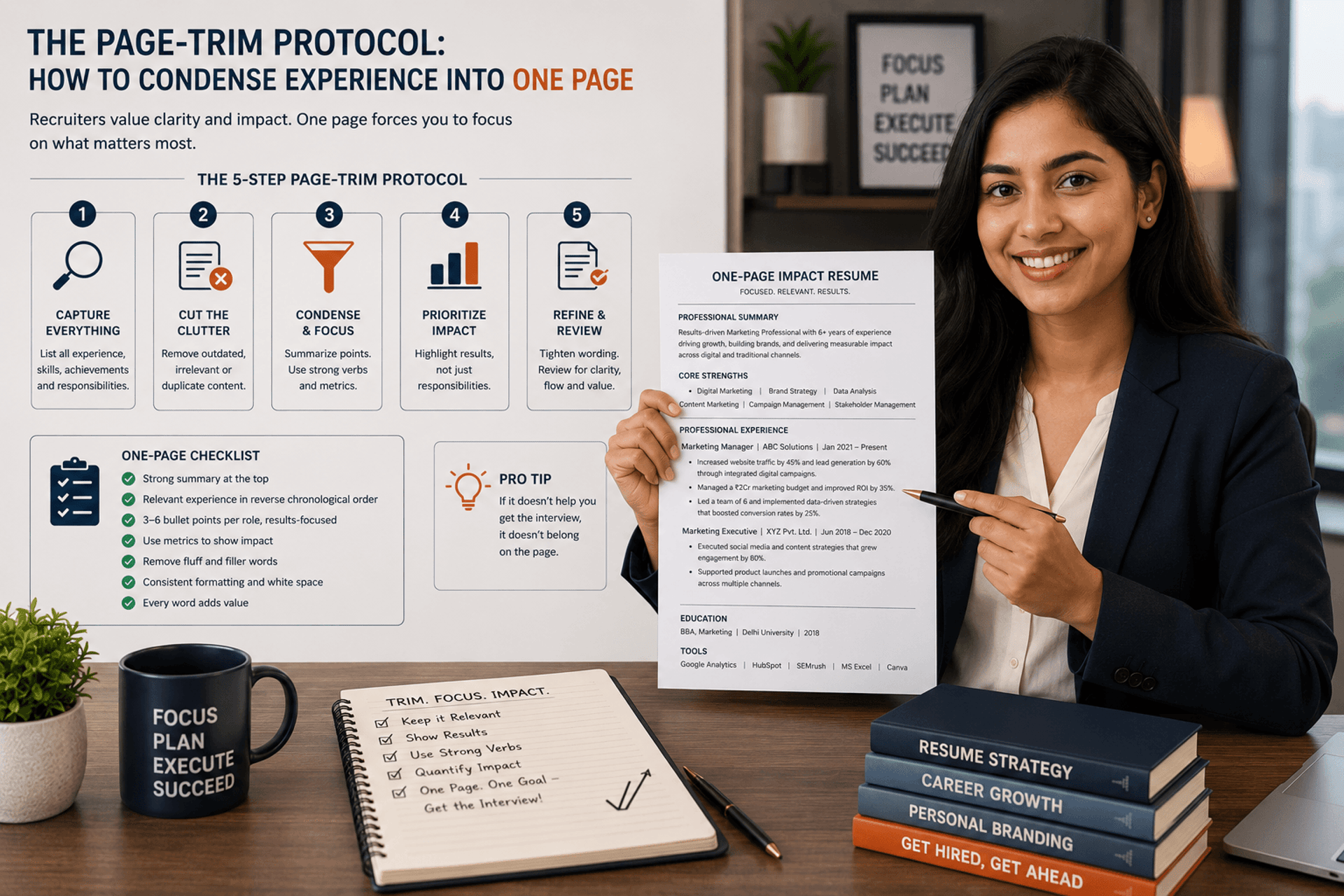
Learning Page-Trim Protocol

Introduction
A long, wordy resume is often the result of an undisciplined editing process. When layout constraints are ignored, important achievements get buried under walls of text, and casual reviewers miss key data points.
For professionals with under five to seven years of experience, a strict single-page limit is the industry standard. Forcing yourself to work within this spatial constraint makes you evaluate your career history critically, ensuring only your highest-impact achievements remain. Using a systematic editing process allows you to maintain great readability while cutting out visual clutter.
The Spatial Tuning Hierarchy
When text spills over by just a few lines onto a second page, do not simply shrink your font size to an unreadable 8-point block. Instead, optimize your page layout by adjusting your formatting settings step-by-step.
If you adjust your margins to 0.5 inches on all sides and tighten your line spacing to 1.15, you instantly reclaim valuable space. These technical adjustments often bring minor page spills back onto a single page without requiring you to cut a single word of your actual experience.
Syntactic Reduction: Trimming Textual Drag
If formatting adjustments alone do not solve the page spill, you must edit your sentences to increase their information density. This means identifying and removing weak filler words, passive descriptions, and redundant prepositions.
1. Eliminating Prepositional Drag
Prepositional phrases like "for the purpose of" or "in order to" add length to your sentences without adding any real professional value.
Weak (18 words): "Led a team in order to streamline the distribution of marketing materials for the purpose of increasing sales."
Trimmed (12 words): "Directed a marketing distribution overhaul, accelerating delivery times to drive a 14% sales increase."
2. Merging Overlapping Bullet Points
If two bullet points describe minor parts of the same project, combine them into a single, high-impact line that connects your action directly to a business outcome.
Before (Two separate lines):
"Responsible for managing the weekly client status reports."
"Used Excel to analyze data for corporate leadership reviews."
After (One unified line):
"Automated weekly client performance tracking pipelines in Excel, cutting executive reporting preparation times by 4 hours."
Curation Rules for Junior Experience
As you progress in your career, your oldest positions lose their relevance. To maintain a strict one-page layout, you must systematically prune or condense your earliest career entries.
If you graduated several years ago, your university projects, club leadership roles, and early internships should no longer take up major space on your page. Condense those early sections into simple, single-line summaries to free up valuable real estate for your current, high-stature corporate achievements.
Maximizing Information Density and Layout Efficiency Without Diluting Career Impact
Long, wordy blocks of text dilute your achievements and cause recruiters to skim past critical information. This tactical protocol outlines how to aggressively trim sentence lengths, group core competencies, and enforce tight layout design boundaries to bring your entire career timeline down to a high-impact single page.
Key Benefits of This Strategy
Guarantees High Visual Engagement: Restricting your document layout to a single page increases information density, ensuring that reviewers see your most impressive data-backed milestones without being forced to scroll.
Forces High-Impact Editing: Implementing strict page-trim constraints helps you cut out outdated day-to-day tasks and repetitive descriptions, leaving only your highest-value professional wins.
Tactical Protocol: Do's and Don'ts
Follow this strict editing checklist to ensure your document fits perfectly onto a single page while maintaining an authoritative presentation:
Copy Editing & Word Trimming
✅ DO ensure that every bullet point stops cleanly before hitting the right margin, preventing a stray word or two from creating an extra line.
✅ DO cut out weak, passive sentence starters like "reassigned to help with" or "tasked with the duty of."
❌ DON'T use long, paragraph-style descriptions for your company profiles; let your bullet points speak for themselves.
❌ DON'T include a dedicated section for your high school milestones if you have already completed a university degree.
Layout & Spacing Discipline
✅ DO verify that your font sizes remain easily readable (keep your body text at a minimum of 10 points).
✅ DO group your individual skills into a single, comma-separated directory block to maximize space efficiency.
❌ DON'T remove your horizontal section dividers just to save space; clear visual separation is essential for scannability.
❌ DON'T use multi-column layouts to force text onto the page, as this can confuse automated screening tools.
_____________________________________________________________________________________________
RESUME & COVER LETTER WRITING
The Page-Trim Protocol: How to Condense Experience into One Page
Executing precise syntactic and spatial edits to maximize information
density within strict layout constraints.
Conclusion
Fitting your professional history onto a single page is a matter of strict editing and formatting discipline. By adjusting your page layout settings, eliminating weak filler phrases, and condensing older positions, you create a balanced document that showcases your career history clearly. Once you master this clean, single-page layout, your next step is deciding when to use conservative, traditional formats versus modern, minimalist alternatives.
Our next article explores these design choices: Creative vs. Traditional Frameworks: Selecting Layouts by Industry Sector.
Related Articles
JobPark India © 2026 | All Rights Reserved
_____________________________________________________________________________________________________________________________________________
JobPark
"Empowering India's Workforce Journey"
JobPark is a free career guidance platform focused on practical, India‑specific workplace insights. We help students, job seekers, and professionals navigate career growth, workplace practices, and skill development with clarity, confidence, and real‑world relevance.
Career Journey
Quick Links
Career Support
🌟 Free forever. No strings. Just JobPark.
Career Resources Directory