Passing the ATS: Building a Clean, Machine-Readable Resume
Modern corporate recruitment relies on digital gatekeepers to process high-volume applications. This guide breaks down how parsing algorithms read profiles, the design elements that trigger automatic rejections, and the exact technical steps needed to make your resume perfectly machine-readable.
RESUME WRITING
Updated 8 July 2026
7/7/20264 min read
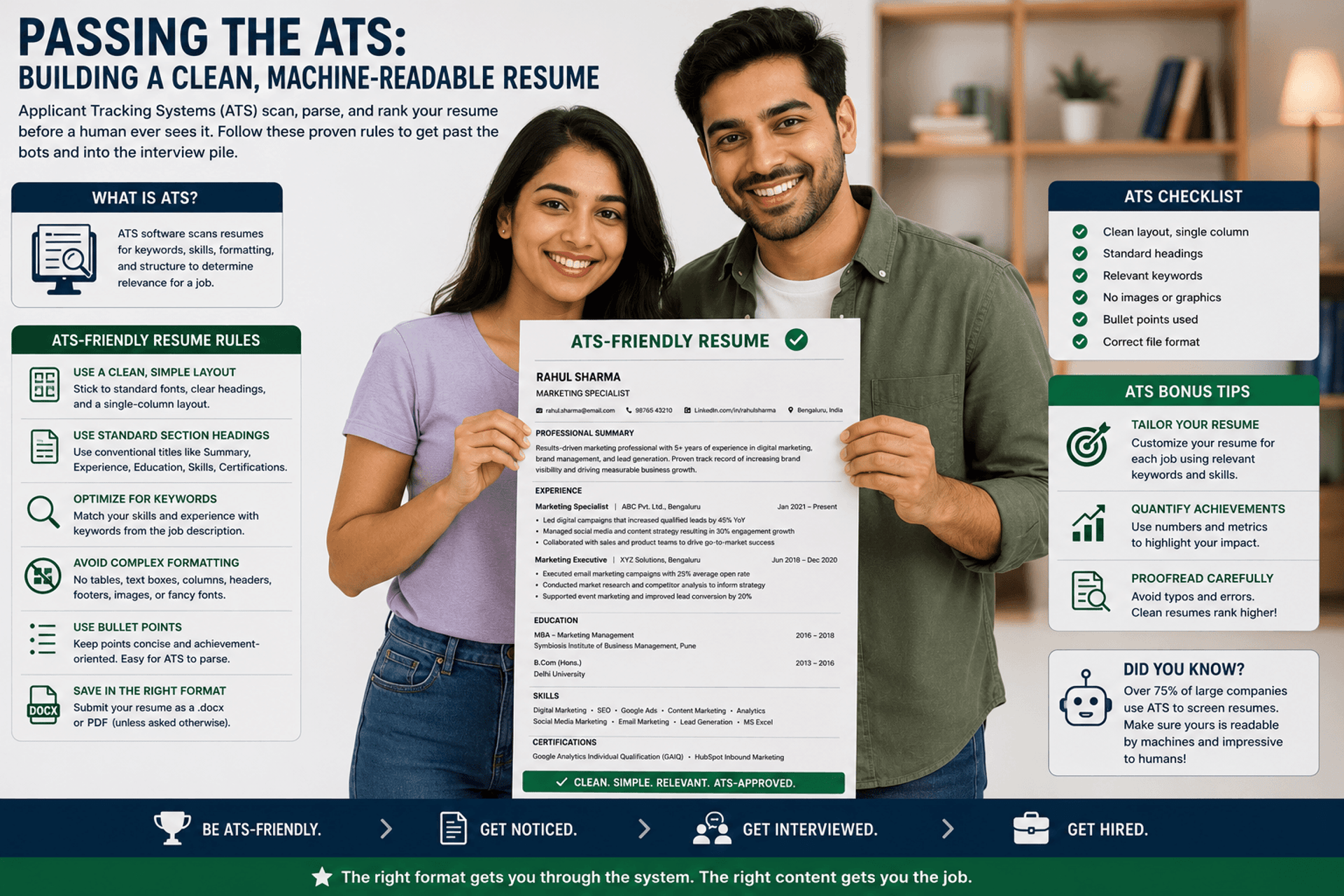
Designing ATS-Friendly Resume

Introduction
Before a human recruiter ever sees your application, your resume must clear an automated digital gatekeeper. Modern corporations use Applicant Tracking Systems (ATS) to parse, tag, and rank incoming profiles. If your file is built with non-standard formatting, embedded graphics, or unreadable code, the system fails to extract your information—rendering your application invisible to hiring teams.
Optimizing your document for these parsing algorithms is a technical necessity to ensure your profile reaches human eyes.
How Parsing Algorithms Process Your Profile
An ATS does not read your resume the way a human does; it converts the document into a raw text string, analyzes the syntax, and maps data points into discrete database fields like Work Experience, Skills, and Education.
The system looks for structural cues to categorize your history. Standard section headings (such as "Professional Experience") tell the script exactly where to begin indexing your roles. If the algorithm cannot find recognizable headers or runs into unparseable design elements, it splits your text incorrectly or drops key career milestones entirely.
Technical Formatting Elements to Avoid
To maintain machine readability, you must eliminate complex design features. While creative layouts might look appealing to an untrained eye, they act as digital blockades for screening software.
Tables and Text Boxes: Most legacy parsers cannot read across columns or within floating containers. Text inside a table often gets completely omitted or merged out of chronological order.
Icons, Graphics, and Progress Bars: Graphics, skill charts, and rating bars are read by the system as corrupted characters or blank blocks. Representing a skill with a visual "4 out of 5 stars" bar leaves the system with zero readable data for that competence.
Headers and Footers: Do not place vital contact details inside the literal Header or Footer sections of a Microsoft Word or PDF document. Many parsers completely ignore these margins, causing your application to appear without a name or phone number.
Non-Standard Fonts: Stick to universally supported system fonts. Exotic or downloaded web typography fails to render during text conversion, corrupting your formatting.
File Format Architecture: PDF vs. DOCX
Choosing the right file extension depends heavily on the specific application portal you encounter.
The Word Document (.docx)
The .docx format is the most stable and universally readable file extension for automated systems. Because it contains clean XML-based text strings, tracking algorithms can crawl its contents with near-zero parsing errors.
The Portable Document Format (.pdf)
A PDF preserves your exact visual design for human reviewers. However, if a PDF is saved as a flattened image scan rather than an exported text document, the parser reads it as an empty image block.
The Selection Rule: If an application portal explicitly lists acceptable formats, choose .docx for older corporate portals (like older versions of Taleo) to maximize parsing accuracy. For modern platforms (like Workday, Greenhouse, or Lever), a properly exported, text-selectable PDF is perfectly acceptable and preserves your visual layout.
Algorithmic Keyword Alignment
Once the system extracts your raw text, it scores your profile against the target job description based on contextual keyword density.
Keyword stuffing—listing terms in a random block of hidden white text—is easily caught by modern systems and results in an automatic ban. Instead, naturally weave exact phrases from the job description into your core bullet points. If a listing requires "Data-Driven Performance Optimization," ensure your resume echoes that exact phrase rather than a generic alternative like "improved systems using data."
Optimizing Document Architecture for Algorithmic Screening Systems
Modern applicant tracking systems strip away text formatting to evaluate your profile before a human ever sees it. This operational roadmap details how to build a clean, parse-ready document layout that prevents critical text strings from being scrambled or missed.
Key Benefits of This Strategy
Eliminates Parsing Errors: Removing complex design elements like tables, graphic text boxes, and non-standard symbols guarantees that tracking software reads and extracts your contact details, job titles, and dates perfectly.
Boosts Initial Matching Scores: Tailoring your resume's vocabulary to match the technical nouns and hard skills requested in a job description pushes your profile past initial algorithmic scoring filters.
Tactical Protocol: Do's and Don'ts
Follow this strict technical execution checklist to guarantee your profile clears digital screenings:
Structural & Technical Execution
✅ DO export your file directly from text editors to maintain selectable, machine-readable text vectors.
✅ DO use standard, single-column layouts that read naturally from left to right and top to bottom.
❌ DON'T use tables, text boxes, graphic dividers, or multi-column grids to organize your core work history.
❌ DON'T use non-standard section titles like "Where I've Been"; stick to recognized terms like "Professional Experience."
Content & Keyword Mapping
✅ DO include both the spelled-out term and the acronym for core technical skills (e.g., "Search Engine Optimization (SEO)").
✅ DO align your job titles and core competencies with the exact vocabulary used in the target job posting.
❌ DON'T hide keywords in white font or dump unformatted keyword lists into your summary section.
❌ DON'T upload an image scan or a scanned photocopy of your resume, as machines cannot read flat pixels.
_____________________________________________________________________________________________
RESUME & COVER LETTER WRITING
Passing the ATS: Building a Clean, Machine-Readable Resume
Demystifying automated screening systems to ensure your
professional profile reaches human recruiters.
Conclusion
Passing digital screening software is a matter of strict formatting discipline. By stripping away problematic design elements like tables, text boxes, and non-standard fonts, you remove the technical friction that keeps your profile hidden. Once you establish a flawless, machine-readable file architecture, your next priority is ensuring that the content within that architecture carries immense professional weight.
Our next article addresses how to write high-impact achievements: Quantifying Work Experience: Turning Responsibilities into Achievements.
Related Articles
JobPark India © 2026 | All Rights Reserved
_____________________________________________________________________________________________________________________________________________
JobPark
"Empowering India's Workforce Journey"
JobPark is a free career guidance platform focused on practical, India‑specific workplace insights. We help students, job seekers, and professionals navigate career growth, workplace practices, and skill development with clarity, confidence, and real‑world relevance.
Career Journey
Quick Links
Career Support
🌟 Free forever. No strings. Just JobPark.
Career Resources Directory